


Commercial Appeal
2.8120.00 Reviews
App Specs
- Version
- 8.10.3
- Updated On
- License
- Free
- Downloads
- 10,000+
- Developer
- USA TODAY Co.
- Categories
- News & Magazines
- Platform
- Android
Screenshots







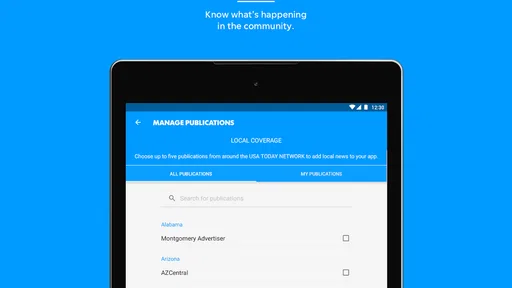
 Analysis by AppCompare
Commercial Appeal is the kind of news app I would open when I want local reporting without giving up the wider picture. Developed by USA TODAY Co., it sits in the News & Magazines category and focuses on coverage connected to the Commercial Appeal, with national stories, photography, and video alongside local updates. I found its strongest idea simple but useful: it brings community-level news into the same reading space as larger USA TODAY coverage.
That focus matters because local news is often the first thing people lose when they rely only on broad national news apps. A national reader may know what is happening across the country but miss developments affecting nearby schools, roads, public services, courts, businesses, or community events. Commercial Appeal is aimed at closing that gap. It is free to install, rated for Everyone 10+, and currently listed as version 8.10.3 for devices running Android 8.0 or later.
My overall reaction is mixed in a useful way. The app can be valuable if local relevance is your priority, especially when you want quick access to reporting and visual coverage in one place. At the same time, its average rating of 2.7 from 239 ratings suggests that the experience has not worked equally well for everyone. I would not treat that rating as a complete verdict, but I would take it as a reason to test the app yourself rather than assuming it will replace every other news source.
Local news becomes more useful when it is placed in context
The central capability here is the combination of local and national news. That sounds straightforward, but it changes how I use the app. Instead of reading a local story in isolation and then opening another service to understand its broader significance, I can move between community reporting and larger developments from the same news environment.
For example, a local business story may make more sense when read beside national economic coverage. A regional weather event may connect to wider transportation or emergency news. A public policy decision can affect one area directly while also reflecting a national debate. The practical benefit is not simply having more headlines; it is having a better chance of seeing how nearby events fit into a larger story.
The app also puts emphasis on photography and video. That is important for stories where location and atmosphere matter. A written report can explain what happened, but images may show the scale of a public event, the condition of a neighborhood, or the human side of a developing story more immediately. Video can be useful when a scene, statement, or event is easier to understand by watching than by reading a short summary.
The real strength is the local-to-national connection, not the sheer number of headlines. If I only wanted a quick national news briefing, I would choose a broader news reader. If I only wanted local alerts, I might prefer a dedicated local source or a notification-based service. Commercial Appeal makes more sense in the middle: it is for readers who want local reporting to remain the main reason for opening the app while still having national context close by.
Worth Reading Before You Choose

EA SPORTS FC Mobile 26 Is a Bigger Football Game, but It Takes Time

Flipboard Shows What News Apps Must Do Beyond the Feed

Switching to Android Auto Means Rethinking Your Driving Routine

Google Calendar Makes a Crowded Week Easier to Manage

Ludo King Makes the Most of the Minutes Between Plans

Baby Panda World Brings Quick Play to Modern Phones, but Its Game Library Feels Busy
What the reading experience feels like
In everyday use, I would approach this app as a destination rather than an automatic background feed. I would open it during a morning routine, scan the local headlines first, and then use the national coverage to fill in the broader picture. That order is more effective than starting with general news and hoping local stories appear naturally.
The visual material changes the pace of reading. A text-heavy news app encourages me to move quickly from headline to headline. Commercial Appeal is more appealing when I want to pause on a significant local story, look at the accompanying photography, or watch a relevant video. This makes it better suited to a short but focused reading session than to endless headline scrolling.
I also see a practical advantage for people who do not live in the area full time but still care about it. Former residents, family members, students away from home, and people following local institutions can use a local publication as a way to maintain a connection. The national material helps prevent the experience from feeling too narrow, while the local emphasis keeps it more personal than a general news app.
One detail I would keep in mind is that rich media can affect how I consume news. Video is helpful when I have time and a suitable connection, but it is less convenient when I am trying to read quietly or conserve mobile data. For a commute, waiting room, or quick lunch break, written stories may be the more practical choice. I would not judge the app only by its visual presentation; I would use the format that fits the moment.
A realistic morning workflow
Imagine I have ten minutes before work and want to know whether anything nearby could affect my day. I would open the app and look for local developments first: traffic-related news, public announcements, community events, or other stories with immediate regional relevance. I would then check the national section for major developments that might influence the local story or my wider plans.
If one item looks important, I would read the full report instead of relying on the headline. After that, I would use the photo or video when it adds information rather than treating it as decoration. This is a small but worthwhile habit: visual content is most useful when it helps establish place, timing, scale, or reaction. It can be less useful when I am only looking for a fast factual update.
That workflow also shows where the app should not be my only source. If I need urgent instructions, emergency information, or highly specific service updates, I would verify them through the relevant official channel. A news app is useful for reporting and context, but I would not use it as a substitute for direct public notices when timing is critical.
Where it fits beside other news choices
Compared with a general news aggregator, Commercial Appeal offers a clearer local identity. Aggregators are convenient because they collect articles from many publishers, but that convenience can make local coverage feel buried under national or international headlines. Here, the local focus gives me a reason to return, especially when I care about one community rather than simply wanting a broad news mix.
Compared with the mobile website of a local newspaper, an app can feel more direct because it keeps the publication close at hand. The trade-off is that a website may be easier to open occasionally without committing storage or adjusting to an app-specific interface. My choice would depend on how often I read the publication. Regular readers are more likely to benefit from the dedicated app; occasional readers may find the browser experience sufficient.
Compared with social media, the app is a better starting point when I want reporting presented as news rather than a stream of reactions. Social platforms can surface information quickly, but they also mix firsthand posts, commentary, rumors, and unrelated content. Commercial Appeal gives me a more focused editorial destination. I would still use social platforms to discover what people are discussing, but I would prefer a news report when I need clearer context.
Compared with a paid newspaper subscription app, the free entry point makes this easier to try. However, in-app purchases range from $14.99 to $69.99 per item, so I would check the purchase screen carefully before confirming anything. The free download does not automatically mean every part of the experience will remain free. That distinction is especially important for readers who want predictable costs.
Important trade-offs before making it your main news app
The first trade-off is focus. Local specialization is the reason to install Commercial Appeal, but it can also make the app less satisfying for someone who wants international reporting, technology coverage, finance, sports from many regions, or a highly customized news mix. I would not choose it as my only news source if my interests are broad and constantly changing.
The second is the app’s uneven reputation among users. An average rating of 2.7 is not a technical diagnosis, and ratings can reflect different expectations, devices, updates, or frustrations. Still, it tells me to pay attention during the first few sessions. I would check whether the app loads reliably on my phone, whether the article flow feels comfortable, and whether the available coverage matches the local topics I actually follow.
The third concerns paid content and purchase decisions. Because individual in-app purchases can reach $69.99, I would not tap through subscription or purchase prompts casually. I would read the terms shown on the purchase screen and decide whether the added access is worthwhile for my reading habits. Someone who checks local news once a week may not see enough value, while a resident who depends on the publication for regular reporting may judge it differently.
The fourth trade-off is attention. Photography and video can make a story more immediate, but they can also encourage me to spend longer in the app than planned. I would use the app deliberately, especially if I am trying to limit screen time. A short headline check and a focused article are different experiences from watching several clips in succession.
Who is most likely to get value from it?
I think the best audience is people with a direct connection to the community covered by the Commercial Appeal. That includes current residents, relatives of residents, local workers, students, and anyone who needs to understand what is happening nearby. The app is also useful for readers who appreciate seeing local stories supported by strong visual material rather than reading short text-only updates.
It may also suit someone who wants a simple two-layer routine: local news first, national context second. That is a more specific need than “I want news,” and the app serves it better than a generic aggregator. I would recommend trying it if the local coverage is the part that will determine whether you open the app repeatedly.
I would be more cautious about recommending it to a reader who wants a highly personalized feed, a single source for every subject, or an entirely free experience with no purchase prompts. I would also suggest looking elsewhere if the app’s local focus does not match the area or institutions the reader cares about. A well-made local news app is still the wrong choice when its coverage is not relevant to your daily life.
Families may find the age rating reassuring because the app is marked Everyone 10+, but I would still guide younger readers through news stories when topics are difficult or emotionally intense. News content can change quickly, and an age label does not replace a parent’s judgment about what a child is ready to read or watch.
My verdict after weighing the useful parts against the friction
Commercial Appeal has a clear purpose, and that is its biggest advantage. It is not trying to be every kind of news service at once. Its value comes from keeping local reporting at the center while adding national stories, photography, and video that help me understand more than a single headline.
I would install it when local awareness is important and use it as part of a deliberate reading routine. I would begin with the local coverage, open national stories only when they add context, and treat video as an optional layer rather than the main reason to use the app. I would also review any purchase screen carefully because the presence of in-app items means the free download should not be confused with unlimited free access.
The app is not a universal replacement for a national news reader, official alerts, or a broad aggregator. Its rating of 2.7 also makes it sensible to test the current version on your own device before relying on it heavily. Even so, for readers who want their community’s news to remain visible instead of being lost in a national feed, the app offers a focused and understandable reason to exist.
My recommendation is therefore conditional but positive: try it if local coverage is your priority, especially if photographs and video help you connect with stories. Skip it if you want a completely generalized news dashboard or dislike evaluating optional purchases. For the right reader, Commercial Appeal works best as a local news companion with national perspective, not as the only news app on the phone.
Pros
- Clear
- well-organized coverage of local news and community stories.
- Useful source for following Chattanooga-area events and developments.
- Articles load quickly and are easy to read on mobile devices.
- Provides timely updates on local issues and public affairs.
- Offers a convenient digital alternative to the printed newspaper.
Cons
- Coverage is mainly regional and may not interest users outside the area.
- Some content may require a subscription or account to access fully.
- Advertising can make parts of the app feel visually crowded.
- Breaking-news updates may vary depending on the story and location.
- The app may use notifications that some users find too frequent.
FAQs for Commercial Appeal
What is Commercial Appeal, and what can I read in the app?
Commercial Appeal is a news app focused on local, regional, and national stories, with particular attention to the Memphis area and surrounding communities. After installing it, users can browse breaking news, politics, sports, business, entertainment, lifestyle articles, and opinion content. The available sections and story selection may change throughout the day as new reports are published.
Is the Commercial Appeal app free to download and use?
The Commercial Appeal app can generally be downloaded at no cost from the official Android or iOS store. However, free access may be limited, especially when reading premium articles or reaching a monthly article allowance. Some content may require a digital subscription. Before downloading, users should review the current subscription options, trial terms, and pricing displayed in the app or on the official website.
Does Commercial Appeal require an account or subscription?
You may be able to open the app and read selected articles without creating an account, but an account is usually needed to access subscriber features, save preferences, manage alerts, or synchronize access across devices. A subscription may also be required for unlimited reading and premium content. The exact requirements can vary, so check the sign-in and subscription screens before completing registration.
What features are available in the Commercial Appeal app?
The app typically provides a mobile news-reading experience with categorized articles, breaking-news updates, image galleries, search tools, and push notifications. Depending on the current version, subscribers may also receive enhanced access to premium stories and digital newspaper content. In my review, the usefulness of the app depends largely on notification settings, since frequent alerts can be adjusted to focus only on topics that matter to you.
Can I use Commercial Appeal offline or on multiple devices?
The app is primarily designed for online reading, so an internet connection is normally required to load the latest stories, images, and updates. Some content may remain temporarily available through caching, but this should not be treated as a complete offline mode. If you subscribe, signing in with the same account may allow access on multiple compatible devices, subject to the publisher’s current subscription rules.


